 Docs
Docs
Data Store
The simplest use case of Kinvey is storing and retrieving data to and from your cloud backend.
The basic unit of data is an entity and entities of the same kind are organized in collections. An entity is a set of key-value pairs which are stored in the backend in JSON format. Kinvey's libraries automatically translate your native objects to JSON.
Kinvey's data store provides simple CRUD operations on data, as well as powerful filtering and aggregation.
Collections
To start working with a collection, you need to instantiate a DataStore in your application. Each DataStore represents a collection on your backend.
var dataStore = Kinvey.DataStore.collection('collection-name');Through the remainder of this guide, we will refer to the instance we just retrieved as dataStore.
Optionally, you can configure the DataStore type when creating it. To understand the types of data stores and when to use each type, refer to the Data Store Types section.
Data Store Types
Cache store type has been deprecated, and will be removed from the SDK entirely as early as December 1, 2019. If you are using the Cache store, please make changes to move to a different store type. The Auto store type has been introduced as a replacement for the Cache store.
When you get an instance of a data store in your application, you can optionally select a data store type. The type has to do with how the library handles intermittent or prolonged interruptions in connectivity to the backend.
Choose a type that most closely resembles your data requirements.
- DataStoreType.Sync: You want a copy of some (or all) the data from your backend to be available locally on the device and you like to sync it periodically with the backend.
- DataStoreType.Auto: You want to read and write data primarily from the backend, but want to be more robust against varying network conditions and short periods of network loss.
- DataStoreType.Network: You want the data in your backend to never be stored locally on the device, even if it means that the app will not offer offline use.
- DataStoreType.Cache: Deprecated You want data stored on the device to optimize your app's performance and/or provide offline support for short periods of network loss. This is the default data store type if a type is not explicitly set.
Head to the Specify Data Store Type section to learn how to request the data store type that you selected.
Entities
The Kinvey service has the concept of entities, which represent a single resource.
{
    _id: 'entity-id',
    key1: 'value1',
    key2: 'value2'
    ...
}
The library does not provide any built-in classes to represent entities. There are a large variety of third party JavaScript libraries which do provide this, and most of them will accept object literals as entity attributes.
Fetching
You can retrieve entities by either looking them up using an ID, or by querying a collection.
To overcome these limitations, use paging.
Note that for Sync, Auto, and Cache stores the entity limit does not apply if the result is entirely returned from the local cache.
For the Auto data store type, the Kinvey JavaScript library uses promises to return data on find operations.
For the Cache, Network, and Sync data store types, the Kinvey JavaScript library uses the observable pattern to return data on find operations. APIs that fetch data require the application to register a subscriber that gets invoked when data is available. We use Observables to accomplish this.
When data is retrieved from multiple sources (i.e. cache and backend), the subscriber gets invoked multiple times - first with the results from the cache; then with the results from the backend.
Fetching by Id
To fetch an (one) entity by id, call dataStore.findById.
var stream = dataStore.findById('entity-id');
stream.subscribe(function onNext(entity) {
  // ...
}, function onError(error) {
  // ...
}, function onComplete() {
  // ...
});
Fetching by Query
To fetch all entities in a collection, call dataStore.find.
var stream = dataStore.find();
stream.subscribe(function onNext(entities) {
  // ...
}, function onError(error) {
  // ...
}, function onComplete() {
  // ...
});
To fetch multiple entities using a query, call dataStore.find and pass in a query.
var query = new Kinvey.Query();
query.equalTo('field', 'value');
var stream = dataStore.find(query);
stream.subscribe(function onNext(entities) {
  // ...
}, function onError(error) {
  // ...
}, function onComplete() {
  // ...
});
It's worth noting that an empty array is returned when the query matches zero entities.
Saving
You can save an entity by calling dataStore.save.
var promise = dataStore.save({
  _id: 'optional-id',
  field: 'value'
}).then(function onSuccess(entity) {
  // ...
}).catch(function onError(error) {
  // ...
});
The save method acts as upsert. The library uses the _id property of the entity to distinguish between updates and inserts.
If the entity has an
_id, the library treats it as an update to an existing entity.If the entity does not have an
_id, the library treats it as a new entity. The Kinvey backend assigns an automatic_idfor a new entity.
_id, you should avoid values that are exactly 12 or 24 symbols in length. Such values are automatically converted to BSON ObjectID and are not stored as strings in the database, which can interfere with querying and other operations.
To ensure that no items with 12 or 24 symbols long _id are stored in the collection, you can create a pre-save hook that either prevents saving such items, or appends an additional symbol (for example, underscore) to the _id:
if (_id.length === 12 || _id.length === 24) {
  _id += "_";
}
Creating Multiple Entities at Once
To create multiple entities at once, call dataStore.create and pass in an array containing the entities that you want to create:
var promise = dataStore.create([{field: 'value1'}, {field: 'value2'}
]).then(
    (result) => {
      // ...
      // console.log(result.entities);
      // console.log(result.errors);
    })
    .catch((generalError) => {
      // ...
      // console.log(generalError);
    });
The response is comprised of an entities array that shows the items which were created successfully and an errors array which appears when some items failed to be created. Here is an example response for a request that attempts to create two entities but succeeds only for one of them:
{
  "entities": [
    {
      "_id": "entity-id",
      "field": "value1",
      "_acl": {
        "creator": "5ef49b7576723200150be295"
      },
      "_kmd": {
        "lmt": "2020-07-09T16:16:37.597Z",
        "ect": "2020-07-09T16:16:37.597Z"
      }
    },
    null
  ],
  "errors": [
    {
      "error": "KinveyInternalErrorRetry",
      "description": "The Kinvey server encountered an unexpected error. Please retry your request.",
      "debug": "An entity with that _id already exists in this collection",
      "index": 1
    }
  ]
}Deleting
To delete an entity, call dataStore.removeById and pass in the entity _id.
var promise = dataStore.removeById('entity-id')
promise = promise.then(function onSuccess(result) {
  // ...
}).catch(function onError(error) {
  // ...
});
Deleting Multiple Entities at Once
To delete multiple entities at once, call dataStore.remove. Optionally, you can pass in a query to only delete entities matching the query.
var query = new Kinvey.Query();
query.equalTo('property', 'value');

var promise = dataStore.remove(query)
promise = promise.then(function onSuccess(result) {
  // ...
}).catch(function onError(error) {
  // ...
});
Metadata
Every entity has metadata associated with it. The metadata is accessible through the entities _kmd property. Alternatively, you can use the Kinvey.Metadata class to easily extract this metadata.
var entity = {
  _id: 'entity-id',
  _acl: { /*ACL*/ },
  _kmd: { /*Metadata*/ },
  prop: 'value'
}
var metadata = new Kinvey.Metadata(entity);
The following properties are exposed on the metadata object:
metadata.createdAtreturns theDatewhen the entity was created on Kinvey.metadata.lastModifiedreturns theDatewhen the entity was last updated on Kinvey.
_kmd object is a system field and cannot be modified by regular users.
However, _kmd.ect and _kmd.lmt can be changed if the request is authenticated using master secret credentials. Be careful if you submit them when updating an entity in this scenario - e.g. the passed values for _kmd.lmt and _kmd.ect will overwrite the autogenerated values of these fields on the server.
_kmd.llt is always autogenerated and cannot be changed even with master secret credentials.
Querying
The Kinvey.Query class allows you to build queries for use in collections. An empty query, by default, matches all entities in a collection.
var query = new Kinvey.Query();Operators
All operator methods as exposed by Kinvey.Query follow the same pattern: the first argument must be the field under condition, while the other arguments specify the exact condition on that field. All operators return the query itself, so it is easy to concatenate multiple conditions on one line.
For example, to select all entities with a rate between 25 and 50:
var query = new Kinvey.Query();
query.greaterThanOrEqualTo('rate', 25).lessThanOrEqualTo('rate', 50);
Comparison Operators
equalTomatches if the field is = the supplied value.greaterThanmatches if the field is > the supplied value.greaterThanOrEqualTomatches if the field is >= the supplied value.lessThanmatches if the field is < the supplied value.lessThanOrEqualTomatches if the field is <= the supplied value.notEqualTomatches if the field is != the supplied value.existsmatches if the field exists.modmatches if the field modulo the supplied divisor (second argument) has the supplied remainder (third argument).matchesmatches if the field matches the supplied regular expression.
^), and case sensitive. To do case insensitive search, create a normalized (i.e. all lowercase) field in your collection and perform the match on that field.
Array Operators
containsmatches if any of the supplied values is an element in the field.containsAllmatches if the supplied values are all elements in the field.notContainedInmatches if the supplied value is not an element in the field.sizematches if the number of elements in the field equals the supplied value.
Modifiers
Query modifiers control how query results are presented. A distinction is made between limit, skip, and sort modifiers.
Limit and Skip
Limit and skip modifiers allow for paging of results. Set the limit to the number of results you want to show per page. The skip modifier indicates how many results are skipped from the beginning.
// Show results 20–40
var query = new Kinvey.Query();
query.limit = 20;
query.skip = 20;limit > 10,000 in the example above, the backend will silently limit the results to only the first 10,000 entities. For this reason, we strongly recommend fetching your data in pages or enabling autopaging.
Note that for Auto, Sync, and Cache stores the entity limit does not apply if the result is entirely returned from the local cache.
Sort
Query results are sorted either in ascending or descending order. It is possible to add multiple fields to sort on.
// Sort on last name (ascending), then on age (descending).
var query = new Kinvey.Query();
query.ascending('last_name');
query.descending('age');B comes before a, and 10 before 2.
Field Selection
By default, all fields in an entity will be retrieved. You can, however, specify specific fields to retrieve. This can be useful to save bandwidth.
var query = new Kinvey.Query();
query.fields = [ 'last_name', 'age' ];Compound Queries
You can combine filters with modifiers within a single query.
// Returns the first five users with last_name “Doe”, sorted by first_name.
var query = new Kinvey.Query();
query.limit = 5;
query.equalTo('last_name', 'Doe');
query.ascending('first_name');
Joining Operators
It is very easy to join multiple queries into one. In order of precedence, the three joining operators are listed below in order of precendence.
andjoins two or more queries using a logical AND operation.norjoins two or more queries using a logical NOR operation.orjoins two or more queries using a logical OR operation.
The example below demonstrates how to join two separate queries.
var query = new Kinvey.Query();
query.equalTo('last_name', 'Doe');
var secondQuery = new Kinvey.Query();
secondQuery.equalTo('last_name', 'Roe')

// Selects all users with last_name “Doe” or “Roe”.
query.or(secondQuery);
Alternatively, the snippet above can be shortened using the join operator inline.
// Selects all users with last_name “Doe” or “Roe”.
var query = new Kinvey.Query();
query.equalTo('last_name', 'Doe').or().equalTo('last_name', 'Roe');
You can build arbitrary complex queries using any join operators. The rule of thumb is to take the precendence order into account when building queries to make sure the correct results are returned.
Counting
To count the number of entities in a collection, call dataStore.count. Optionally, you can pass in a query to only count the entities matching the query.
var stream = dataStore.count(query);
stream.subscribe(function(count) {
  // ...
});
Aggregation/Grouping
Grouping allows you to collect all entities with the same value for a field or fields, and then apply a reduce function (such as count or average) on all those items.
The results are returned as an object literal that represents the list of groups containing the result of the reduce function.
For example, let’s group a collection of companies based on the year they launched.
var stream = dataStore.group(Kinvey.Aggregation.count('launched'));
stream.subscribe(function(result) {
  // Result = [{ count: 1 }] if one company has launched
});
Reduce Functions
The SDK defines the following reduce functions:
Kinvey.Aggregation.count—counts the number of elements in the group.Kinvey.Aggregation.sum—sums together the numeric values of the supplied field.Kinvey.Aggregation.min—finds the minimum of the numeric values of the input field.Kinvey.Aggregation.max—finds the maximum of the numeric values of the input field.Kinvey.Aggregation.average—finds the average of the numeric values of the input field.
Custom Reduce Function
If the predefined reduce functions don't cover the use case that you are coding, you can create an instance of the Aggregation class and pass a custom reduce function.
In the next example, reduceFn() is a function that builds an array of unique city values that it finds in entities. In addition to the city array, the return value contains another property for the city count.
const reduceFn = function(entity, accumulator){
if(accumulator.array.includes(entity.city)){
accumulator.array.push(entity.city);
accumulator.count++;
}
return accumulator;
}
const aggregation = new Kinvey.Aggregation({
initial: { count: 0, array: [] },
reduceFn: reduceFn.toString()
});
var stream = dataStore.group(aggregation);Scoping With Queries
Groups can also take an optional condition. This is a query that acts as a filter that is applied on the server before the reduce function is evaluated. Any limit, skip, and sort modifiers are applied after the reduce function is evaluated.
Continuing the "companies" example, assume we wanted to group only the companies who have offices in Boston. In addition, we want to order the resulting groups by the year they launched and only display the first two.
// Build the query and group.
var query = new Kinvey.Query();
query.equalTo('city', 'Boston');
query.ascending('launched')
query.limit = 2;

var aggregation = Kinvey.Aggregation.count('launched');
aggregation.query = query;

var stream = dataStore.group(aggregation);
stream.subscribe(function(result) {
  // ...
});
Location Querying
See the Location guide for information on how to query data by location.
Caching and Offline
A key aspect of good mobile apps is their ability to render responsive UIs, even under conditions of poor or missing network connectivity. The Kinvey library provides caching and offline capabilities for you to easily manage data access and synchronization between the device and the backend.
Kinvey's DataStore provides configuration options to solve common caching and offline requirements. If you need better control, you can utilize the options described in Granular Control.
Offline and caching write data to the local device using an offline storage provider. If the default provider does not meet your compatibility or performance needs, you can change it using the storage Kinvey instance initialization option.
Specify Data Store Type
When initializing a new DataStore to work with a Kinvey collection, you can optionally specify the DataStore type. The type determines how the SDK handles data reads and writes in full or intermittent absence of connection to the app backend.
In this section:
Sync
Configuring your data store as Sync allows you to pull a copy of your data to the device and work with it completely offline. The library provides APIs to synchronize local data with the backend.
This type of data store is ideal for apps that need to work for long periods without a network connection.
Here is how you should use a Sync store:
// Get an instance
var dataStore = Kinvey.DataStore.collection('books', Kinvey.DataStoreType.Sync);

// Pull data from the backend and save it to the cache.
var promise = dataStore.pull().then(function onSuccess(entities) {
  // ...
}).catch(function onError(error) {
  // ...
});

// Find entities in the cache.
var stream = dataStore.find();
stream.subscribe(function onNext(data) {
  // ...
}, function onError(error) {
  // ...
}, function onCompleted() {
  // ...
});

// Save an entity to the cache. This entity can be synced with
// the backend at a later time.
var entity = {};
var promise = dataStore.save(entity);
promise = promise.then(function onSuccess(entity) {
  // ...
}).catch(function onError(error) {
  // ...
});

// Sync the data store with the backend.
// This will first push any pending local changes to the backend and
// then pull data from the backend and save it in the cache.
var promise = dataStore.sync();
promise = promise.then(function onSuccess(result) {
  // The result will contain the results of the push
  // to the backend and a pull from the backend.
  // result = {
  //   push: [], // pushed entities
  //   pull: [] // pulled entities
  // };
  //
  // Each item in the array of pushed entities will look like the following
  // { _id: '<entity id before push>', entity: <entity after push> }
  // It could also possibly have an error property if the push failed.
  // {
  //   _id: '<entity id before push>',
  //   entity: <entity after push>,
  //   error: <reason push failed>
  // }
}).catch(function onError(error) {
  // ...
});
The Pull, Push, Sync, and Sync Count APIs allow you to synchronize data between the application and the backend.
Auto
Configuring your data store as Auto allows it to primarily work directly with the backend. However, in cases of short network connection interruptions, the library utilizes a local data store to return any results available on the device. Results from previous read requests to the network are stored on the local device with this store type, which is what enables the ability to retrieve results locally when the network cannot be reached.
When your app makes a save request during a network outage, this store type saves the data locally and creates a "pending writes queue" entry to represent the save. You can use the Push operation as soon as the network connection resumes to save the data in the data store.
For the Auto data store type, the Kinvey JavaScript library uses promises to return data on find operations.
The following example shows how to use an Auto store:
const dataStore = Kinvey.DataStore.collection(
        '<collection-name>',
        DataStoreType.Auto
);

// The completion handler will return the data retrieved
// from the network unless the network is unavailable,
// in which case the cached data stored locally will be returned.
dataStore.find()
  .then((entities) => {
    console.log(entities);
  })
  .catch((error) => {
    console.log(error);
  });

// Save an entity. It will be saved to the device and then to your backend.
// If you do not have a network connection, the entity will be stored locally.
// You will need to push it to the server when network reconnects
// using this.collection.push().
const entity = {};
dataStore.collection.save(entity)
  .then((savedEntity) => {
    console.log(savedEntity);
  })
  .catch((error) => {
    console.log(error);
  });
You can think of this data store as a more robust Network data store, where local storage is used to provide more continuity when the network is temporarily unavailable.
Cache
Cache store type has been deprecated, and will be removed from the SDK entirely as early as December 1, 2019. If you are using the Cache store, please make changes to move to a different store type. The Auto store type has been introduced as a replacement for the Cache store.
Configuring your data store as Cache allows you to use the performance optimizations provided by the library. In addition, the cache allows you to work with data when the device goes offline.
The Cache mode is the default mode for the data store. Most of the time you don't need to set it explicitly.
This type of data store is ideal for apps that are generally used with an active network, but may experience short periods of network loss.
Here is how you should use a Cache store:
// Get an instance.
var dataStore = Kinvey.DataStore.collection('books', Kinvey.DataStoreType.Cache);

// Pull data from the backend and save it to the cache.
var promise = dataStore.pull().then(function onSuccess(entities) {
  // ...
}).catch(function onError(error) {
  // ...
});

// Fetch entities from both the cache and the backend
var stream = dataStore.find();
stream.subscribe(function onNext(entities) {
  // ...
}, function onError(error) {
  // ...
}, function onComplete() {
  // ...
});

// Save an entity.
// The entity will first be saved to cache and then to the backend.
// If you don't have a network connection, the entity will be
// stored in cache and can be synced with the backend at a later time.
var entity = {
  title: 'Mobile Library Development'
  author: 'Kinvey'
};

var promise = dataStore.save(entity);
promise = promise.then(function onSuccess(entity) {
  // ...
}).catch(function onError(error) {
  // ...
});
The Cache data store executes all CRUD requests against local storage as well as the backend. Any data retrieved from the backend is stored in the cache. This allows the app to work offline by fetching data that has been cached from past usage.
The Cache data store also stores pending write operations when the app is offline. However, the developer is required to push these pending operations to the backend when the network resumes. The Push API should be used to accomplish this.
The Pull, Push, Sync, and Sync Count APIs allow you to synchronize data between the application and the backend.
Network
Configuring your data store as Network turns off all caching in the library. All requests to fetch and save data are sent to the backend.
We don't recommend this type of data store for apps in production, since the app will not work without network connectivity. However, it may be useful in a development scenario to validate backend data without a device cache.
Here is how you should use a Network store:
// Get an instance
var dataStore = Kinvey.DataStore.collection('books', Kinvey.DataStoreType.Network);

// Fetch data from your backend
var stream = dataStore.find();
stream.subscribe(function onNext(entities) {
  // ...
}, function onError(error) {
  // ...
}, function onComplete() {
  // ...
});

// Save an entity to your backend.
var entity = {
  title: 'Mobile Library Development'
  author: 'Kinvey'
};

var promise = dataStore.save(entity);
promise = promise.then(function onSuccess(entity) {
  // ...
}).catch(function onError(error) {
  // ...
});
Pull Operation
Calling pull() retrieves data from the backend and stores it locally in the cache.
By default, pulling retrieves the entire collection to the device. Optionally, you can provide a query parameter to pull to restrict what entities are retrieved. If you prefer to only retrieve the changes since your last pull operation, you should enable Delta Sync.
The pull API needs a network connection in order to succeed.
var dataStore = Kinvey.DataStore.collection('books', Kinvey.DataStoreType.Sync);

// Pull data from the backend and save it in the cache.
var promise = dataStore.pull();
promise = promise.then(function onSuccess(entities) {
  // ...
}).catch(function onError(error) {
  // ...
});
If your Sync Store has pending local changes, they must be pushed to the backend before pulling data to the store.
Push Operation
Calling push() kicks off a uni-directional push of data from the library to the backend.
The library goes through the following steps to push entities modified in local storage to the backend:
Reads from the "pending writes queue" to determine what entities have been changed locally. The "pending writes queue" maintains a reference for each entity in local storage that has been modified by the app. For an entity that gets modified multiple times in local storage, the queue only references the last modification on the entity.
Creates a REST API request for each pending change in the queue. The type of request depends on the type of modification that was performed locally on the entity.
- If an entity is newly created, the library builds a
POSTrequest. - If an entity is modified, the library builds a
PUTrequest. - If an entity is deleted, the library builds a
DELETErequest.
- If an entity is newly created, the library builds a
Makes the REST API requests against the backend concurrently. Requests are batched to avoid hitting platform limits on the number of open network requests.
- For each successful request, the corresponding reference in the queue is removed.
- For each failed request, the corresponding reference remains persisted in the queue. The library adds information in the
push/syncresponse to indicate that a failure occurred. Push failures are discussed in Handling Push Failures.
Returns a response to the application indicating the count of entities that were successfully synced and a list of errors for entities that failed to sync.
var dataStore = Kinvey.DataStore.collection('books', Kinvey.DataStoreType.Sync);

// Push data from the cache that has changed to the backend.
// No data is retrieved from the backend.
var promise = dataStore.push();
promise = promise.then(function onSuccess(entities) {
  // Each item in the array of pushed entities will look like the following
  // {
  //   _id: '<entity id before push>',
  //   entity: <entity after push>
  // }
  // It could also possibly have an error property if the push failed.
  // {
  //   _id: '<entity id before push>',
  //   entity: <entity after push>,
  //   error: <reason push failed>
  // }
}).catch(function onError(error) {
  // ...
});
Handling Push Failures
The push response contains information about the entities that failed to push to the backend. For each failed entity, the corresponding reference in the pending writes queue is retained. This is to prevent any data loss during the push operation. Consider these options for handling failures:
- Retry pushing your changes at a later time. You can simply call
pushagain on the data store to attempt again. - Ignore the failed changes. You can call
purgeon the data store, which will remove all pending writes from the queue. The failed entity remains in your local cache, but the library will not attempt to push it again to the backend. - Destroy the local cache. You call
clearon the data store, which destroys the local cache for the store. You will need to pull fresh data from the backend to start using the cache again.
Each of the APIs mentioned in this section are described in more detail in the data store API reference.
Sync Operation
Calling sync() kicks off a bi-directional synchronization of data between the library and the backend. First, the library calls push to send local changes to the backend. Subsequently, the library calls pull to fetch data in the collection from the backend and stores it on the device.
You can provide a query as a parameter to the sync API to restrict the data that is pulled from the backend. The query does not affect what data gets pushed to the backend.
If you prefer to only retrieve the changes since your last sync operation, you should enable Delta Sync.
var dataStore = Kinvey.DataStore.collection('books', Kinvey.DataStoreType.Sync);

// Sync the cache and backend.
var promise = dataStore.sync();
promise = promise.then(function onSuccess(result) {
  // The result will contain the results of the push to
  // the backend and a pull from the backend/
  // result = {
  //   push: [], // pushed entities
  //   pull: [] // pulled entities
  // };
  //
  // Each item in the array of pushed entities will look like the following
  // {
  //   _id: '<entity id before push>',
  //   entity: <entity after push>
  // }
  // It could also possibly have an error property if the push failed.
  // {
  //   _id: '<entity id before push>',
  //   entity: <entity after push>,
  //   error: <reason push failed>
  // }
}).catch(function onError(error) {
  // ...
});


// Use a query to sync only a subset of data with the backend.
var query = new Kinvey.Query();
query.equalTo('field', 'value');

var promise = dataStore.sync(query);
promise = promise.then(function onSuccess(result) {
  // ...
}).catch(function onError(error) {
  // ...
});Sync Count Operation
You can retrieve a count of entities modified locally and pending a push to the backend.
// Number of entities modified offline.
var promise = dataStore.pendingSyncCount();
promise = promise.then(function onSuccess(count) {
  // ...
}).catch(function onError() {
  // ...
});
Granular Control
Selecting a DataStoreType is usually sufficient to solve the caching and offline needs of most apps. However, should you desire more control over how data is managed in your app, you can use the granular configuration options provided by the library. The following sections discuss the advanced options available on the DataStore.
Timeout
When performing any datastore operations, you can pass a timeout value as an option to stop the datastore operation after some amount of time if it hasn't already completed.
dataStore.save({
  _id: 'optional-id',
  field: 'value'
}, {
  timeout: 5000 // 5 seconds in ms
})
  .then(function(entity) {
    // ...
  })
  .catch(function(error) {
    // ...
  });
The global default timeout in the SDK is set to 60 seconds. You can set the global timeout to your own value when you initialize the SDK.
Kinvey.init({
  appKey: '<appKey>',
  appSecret: '<appSecret>',
  defaultTimeout: 30000 // 30 seconds in ms
});
Conflict Resolution
When using sync and cache stores, you need to be aware of situations where multiple users could be working on the same entity simultaneously offline. Consider the following scenario:
- User X edits entity A offline.
- User Y edits entity A offline.
- Network connectivity is restored for X, and A is synchronized with Kinvey.
- Network connectivity is restored for Y, and A is synchronized with Kinvey.
In the above scenario, the changes made by user X are overwritten by Y.
The libraries and backend implement a default mechanism of "client wins", which implies that the data in the backend reflects the last client that performed a write. Custom conflict management policies can be implemented with Business Logic.
Delta Sync
When your app handles large amounts of data, syncing entire collections can be expensive in terms of both bandwidth and speed, especially on slower networks. Rather than syncing the entire collection, fetching only new and updated entities can save bandwidth and improve your app's response times.
To help optimize fetching collection data, Kinvey implements Delta Sync, also known as data differencing. When an app performs a pull or find request for a collection that has the Delta Sync feature turned on, the library asks the backend only for those entities that have been created, modified, or deleted since the app last made that same request. This allows the backend to return only a small subset of data rather than the entire set of query results. The library then processes the data and updates its local cache appropriately.
Delta Sync requires the data store to be running in Auto, Cache, or Sync mode.
Calculating the delta is offloaded to the backend for better performance.
Limitations
Delta Sync can bring significant read performance improvements in most situations but you need to have the following limitations in mind:
- Delta Sync does not guarantee data consistency between the server and the client:
- If, on the server, you update an entity, changing the field on which you have previously queried the entity, the entity will not appear as updated in the data delta. This leaves a data discrepancy between the server and the client that you can rectify by making a full sync.
- If, on the server, you use permissions to deny the user read access to an entity that is already cached on the user device, the data delta will not return the entity as updated or deleted.
- External data coming from FlexData or RapidData is not supported.
- Delta Sync is not supported for the User and Files collections.
- If your collection has a Before Business Logic collection hook that calls
response.complete(), Delta Sync requests will not execute and the response from your hook will be returned. - If the request features skip or limit modifiers, the library does a normal Find or Pull and does not utilize Delta Sync.
Configuring Delta Sync
The Delta Sync feature is configured per collection. The performance benefits of Delta Sync will be most noticeable on large collections that update infrequently. On the other hand, it may make sense to keep this feature turned off for small collections. This is because fetching the entire collection, if it's small, is expected to be faster than waiting for the server to calculate the delta and send it back.
Delta Sync is turned off by default for collections.
To turn on Delta Sync for a collection:
- Log in to the Console.
- Navigate to your app and select an environment to work with.
- Under Data, click Collections.
- On the collection card you want to configure, click the Settings icon.
- From the Settings menu, click Delta Set.
- Click Enable Delta Set for this collection.
- Optionally, change the default Deleted TTL in days value.
The Deleted TTL in days option specifies the change history, or the maximum period for which information about deleted collection entities is stored. This change history is required for building a delta. Delta Sync queries requesting changes that precede this period return an error. The library then automatically requests a full sync.
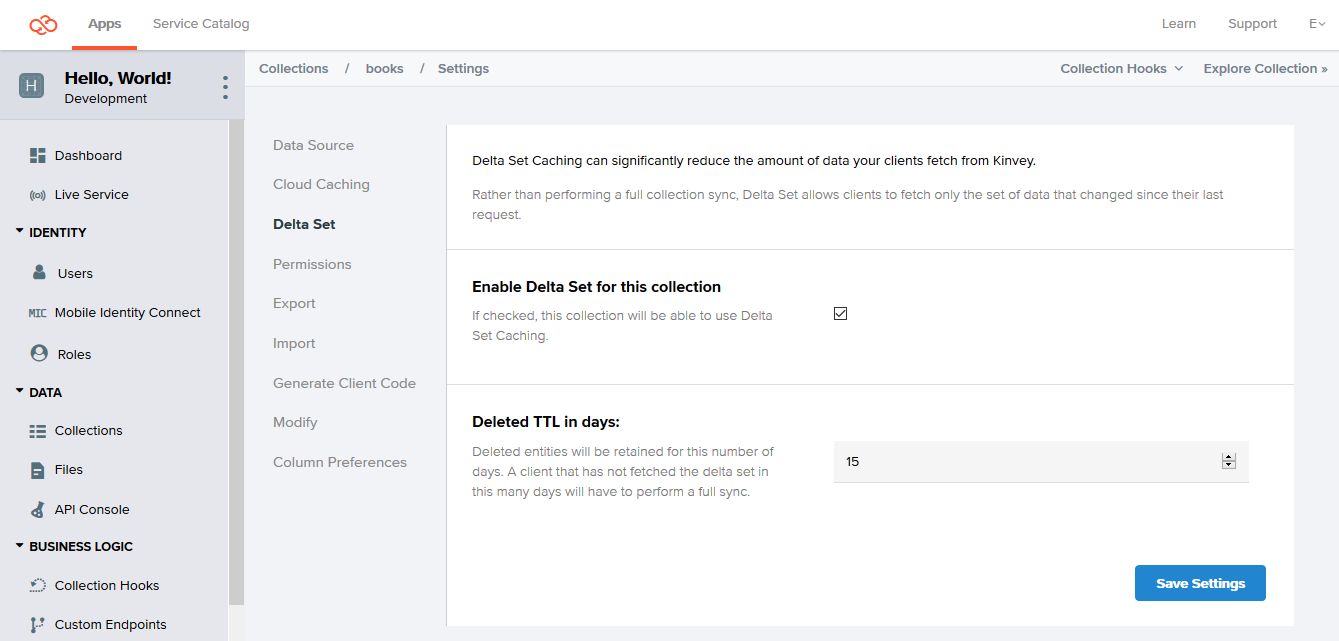
Keeping and returning information about deletions is important, because without it, when receiving the data on the client, you won't be able to determine why the entity is missing from the data delta: because it has been deleted or because it has stayed unchanged.
Turning off Delta Sync for a collection results in permanently removing all information about deleted entities from the server. If you turn on Delta Sync again for the collection at a later stage, the accumulation of information about deleted entities starts from the beginning.
Using Delta Sync
To use Delta Sync, you need to set a flag on the data store instance you are working with.
// Enable Delta Sync on a data store
dataStore.useDeltaSet = true;
After that, data deltas are requested automatically by the library for this data store but only under certain conditions. The library only sends a delta request if all of the following requirements are met. Otherwise it performs a regular pull or find.
- Delta Sync is turned on for the underlying collection on the backend.
- The data store you are working with is in Cache or Sync mode.
- The request that you are making is cached, or in other words, it's not the first time you are making it.
- The request does not feature skip or limit modifiers unless it is the library doing autopaging.
On receiving the delta, the library takes care of deleting those local entities that the delta marked as deleted and creating or updating the respective new or modified entities from the delta.
find and pull operations. Instead of returning the full count of entities inside the collection, each operation returns the number of entities contained in the returned data delta.
Error Handling and Troubleshooting
The library makes using Delta Sync transparent to you, handling Delta Sync-related errors internally. In case you need to track errors linked to this feature, you can enable the library logging at debug level.
The library will still propagate any errors that are not specific to Delta Sync. Examples of such errors include network connectivity issues and authentication errors, as well as errors specific to Find and Pull requests made by the library in case the delta request has errored out.
How it Works
Delta Sync builds on top of information about previous read requests kept in the local cache maintained in Auto, Cache, and Sync data store modes. For this reason, Delta Sync does not operate in Network mode.
To make Delta Sync possible, the backend stores records of deleted entities (a change history) for a configurable amount of time. Records are stored for each collection that has the Delta Sync option turned on.
When your app code sends a read request, the library checks the local cache to see if the request has been executed before. If it has, the library makes a requests for the data delta instead of executing the request directly.
On the backend, the server executes the query normally, but also uses the change history to determine which entities that had matched the query the previous time have been deleted. This way, the server can return information to help the library determine which entities to delete from the local cache.
The backend runs any Before or After Business Logic hooks that might be in place (see Limitations).
The server response contains a pair of arrays: one listing entities created or modified since the last execution time, and another listing entities deleted since that time.
Using the returned data, the library reconstructs the data on the server locally, taking the current state of the cache as a basis. It first deletes all entities listed in the deleted array, so that if any entity was deleted and then re-created with the same ID, it would not be lost. After that, the library caches any newly-created entities and updates existing ones, completing the process.
Additional Information
The Kinvey data store also comes with other features that are optional or have more limited applications.
Automatic Paging
Autopaging is an SDK feature that allows you to query your collection as normal and receive all results without worrying for the 10,000 entities count limit imposed by the backend.
If you expect queries to a collection to regularly return a result count that exceeds the backend limit, you may want to enable autopaging instead of using the limit and skip modifiers every time.
Autopaging works by automatically utilizing limit and skip on the background and storing all received pages in the offline cache. For that reason, autopaging does not work with data stores of type Network.
Autopaging only works with pulling. When you pull with autopaging enabled to refresh the local cache, the SDK reads and stores locally all entities in a collection or a subset of them if you pass a limiting query. It automatically uses paging if the entry count exceeds the backend-imposed limit.
To enable autopaging, call Pull with the following option:
// use the default page size
dataStore.pull(query, { autoPagination: true })

// specify a page size
dataStore.pull(query, { autoPagination: { pageSize: 5000 } })
After you have all the needed entities persisted on the local device, you can call Find as normal. Depending on the store type, the operation is executed against the local store only or against both the local store and the backend. For executions against the local cache, the maximum result count as imposed by the backend does not apply.
Autopaging is subject to the follow caveats:
- Autopaging, similarly to manual paging, has the potential to miss new entities when such are written to the backend collection while a paged Pull is in progress. Each next page retrieval always works on the latest state of the collection which may change between the first and the last page retrieval.
- Enabling autopaging may have performance implications on your app depending on the collection size and the device performance. Fetching large amounts of data can be slow and working with it locally increases the memory and storage footprint on the device.
- When autopaging is enabled, any limit and skip modifiers on outgoing queries are ignored.